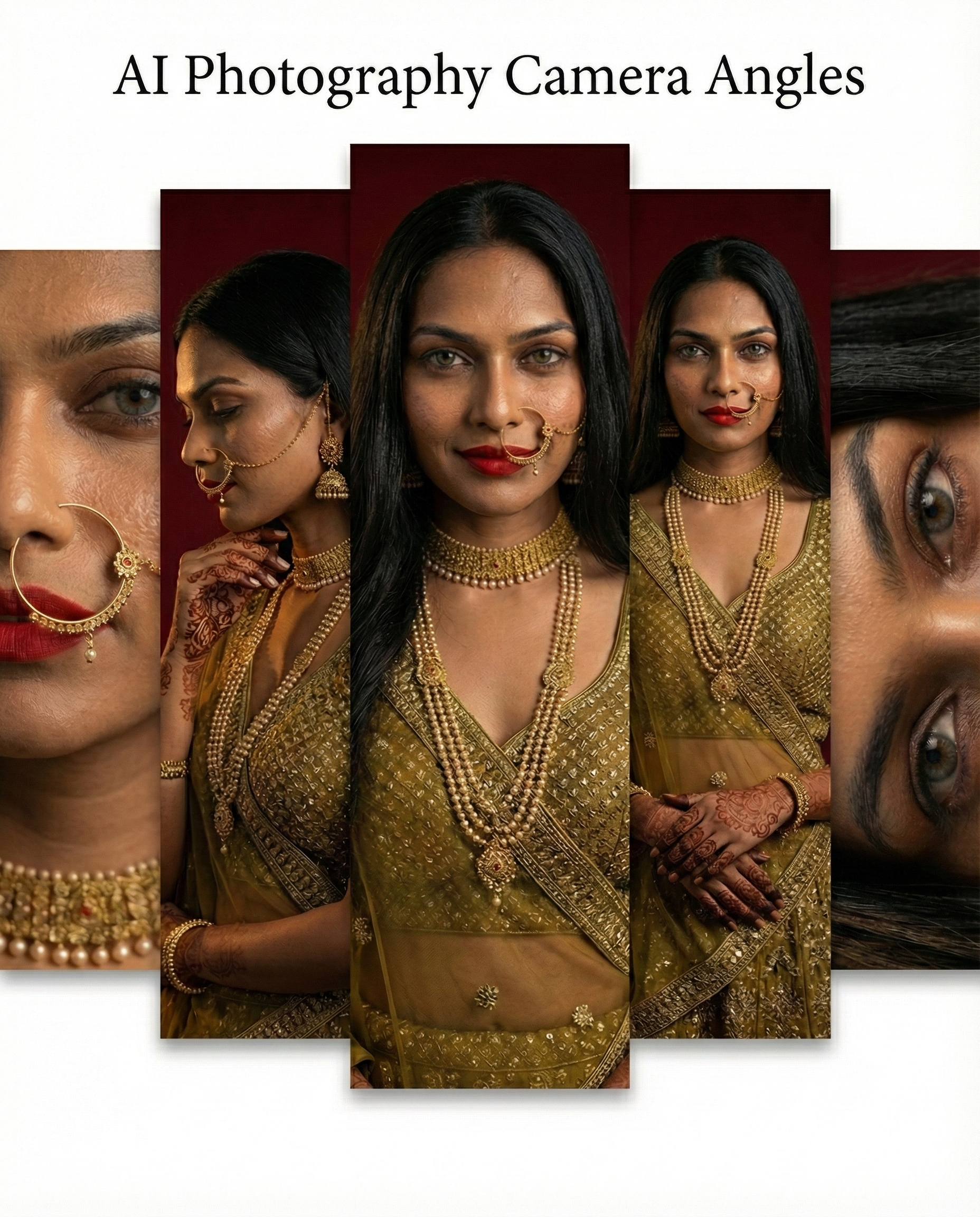
AI Photography Basics: Using Camera Angles for Cinematic Visuals
AI photography is not about writing longer prompts. It’s about thinking visually. Most AI-generated images fail not because of poor models, but because camera intent is missing. Camera angles in AI photography decide what the viewer feels: elegance, intimacy, drama, or realism. When you control the camera, AI image generation shifts from trial and error to deliberate creation. This guide focuses on camera angles in AI photography, with practical explanations and ready-to-use prompts designed to keep facial identity locked using a reference image in tools like Gemini, Gwen Image Edit, Flux Kontext

Why Camera Angles Matter in AI Photography
In real photography, camera angles guide attention. The same rule applies to AI image generation. When camera direction is vague, outputs look generic. When it’s precise, visuals become cinematic and intentional. Camera angles help you:
- Improve AI image composition
- Control focus and depth
- Preserve facial identity across generations
- Create cinematic AI images
- Build consistent AI visual storytelling
In AI photography, camera angles act as creative constraints. And constraints create better results.
Wide Angle Shots in AI Photography: Context and Full Composition
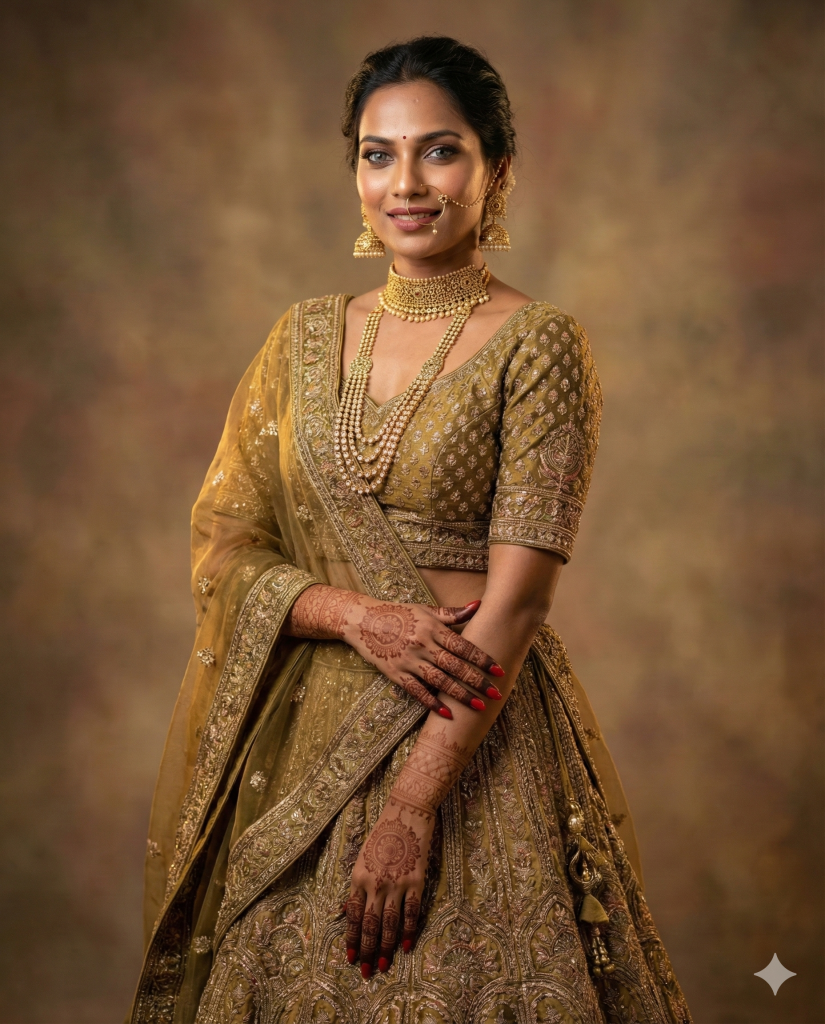
Wide angle shots establish scale and environment. They are ideal when the full subject and outfit matter as much as the face.
Best Use Cases
- Fashion and bridal visuals
- Full outfit shots
- Editorial-style AI photography
What to Control!
- Head-to-toe framing
- Natural posture
- Soft background separation
- Balanced studio lighting
Prompt Example: Wide angle AI photography – Using the uploaded reference image to lock facial identity, generate a wide angle full-body portrait of the same woman. She is wearing an Indian bridal lehenga in warm gold and olive tones. The camera captures her from head to toe, standing gracefully with a relaxed, natural smile. Dupatta draped over her arms, jewellery softly glowing. Studio lighting is warm and cinematic, background gently blurred. Facial features, skin tone, and proportions must exactly match the reference image. Photorealistic, high detail, natural skin texture.
High Angle Shots: Soft and Elegant AI photography Angles
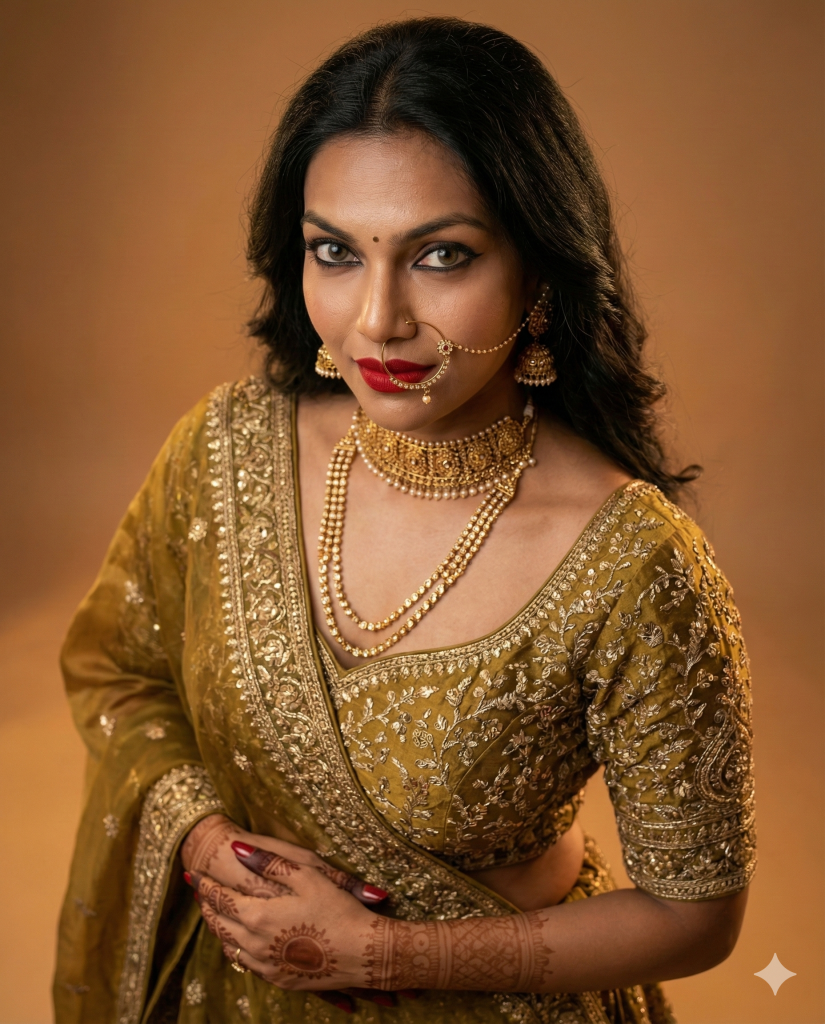
High angle shots place the camera slightly above eye level. This creates a calm, graceful mood and works well for luxury and lifestyle imagery.
Best Use Cases
- Bridal portraits
- Lifestyle branding
- Elegant editorial visuals
What to Control!
- Warm, controlled shadows
- Camera slightly above the subject
- Gentle gaze direction
- Emphasis on jewellery and neckline
Prompt example: High angle AI photography – Using the same reference image for facial identity, generate a high angle portrait. The camera is positioned slightly above eye level, looking down gently. The model gazes softly to the side. Gold choker and maang tikka catch the top light. Warm vintage studio lighting with subtle shadows. Expression calm and elegant. Facial identity must remain perfectly consistent with the reference image. Cinematic, photorealistic AI photography.
Bird’s Eye View Shots: Cinematic AI Image Composition
Bird’s eye view shots create dramatic, graphic compositions. They are powerful but need precision to avoid distortion.
Best Use Cases
- Editorial fashion
- Conceptual AI photography
- Artistic visual storytelling
What Makes it Work!
- Controlled light direction
- Strong symmetry
- Centred subject placement
- Clean background
Prompt Example: Bird’s Eye View AI Photography – Use the uploaded reference image to lock facial identity. Generate a bird’s eye view portrait with the camera positioned directly above the subject. She stands centred, looking up softly. The lehenga spreads in a circular pattern around her, creating a strong visual composition. Jewellery reflects warm light. Skin texture realistic and detailed. Facial features must exactly match the reference image. Cinematic, editorial AI image composition.
Back Shots with a Slight Turn: Subtle AI Visual Storytelling

Back shots add mystery and elegance. They work especially well for fashion details and premium brand visuals.
Best use cases
- Blouse embroidery
- Jewellery chains
- Editorial fashion storytelling
Key elements
- Slight shoulder turn
- Partial face visibility
- Clean neckline framing
- Relaxed posture
Prompt Example: Back Shot AI Photography – Using the same reference image for face locking, generate a back shot with the model facing away from the camera. She gently turns her head back, revealing part of her face. Back embroidery of the blouse is clearly visible. Earrings and maang tikka chain fall naturally. Dupatta draped behind. Warm cinematic lighting. Facial identity and skin texture must remain consistent with the reference image.
Extreme Close-ups: Realism and Emotion in AI Photography
Extreme close-ups test realism. They magnify expressions, skin texture, and lighting accuracy.
Best Use Cases
- Beauty campaigns
- Jewelry advertisements
- Emotional portrait work
What to Control
- Sharp focus on eyes
- Very shallow depth of field
- Natural facial expressions
- Realistic skin texture
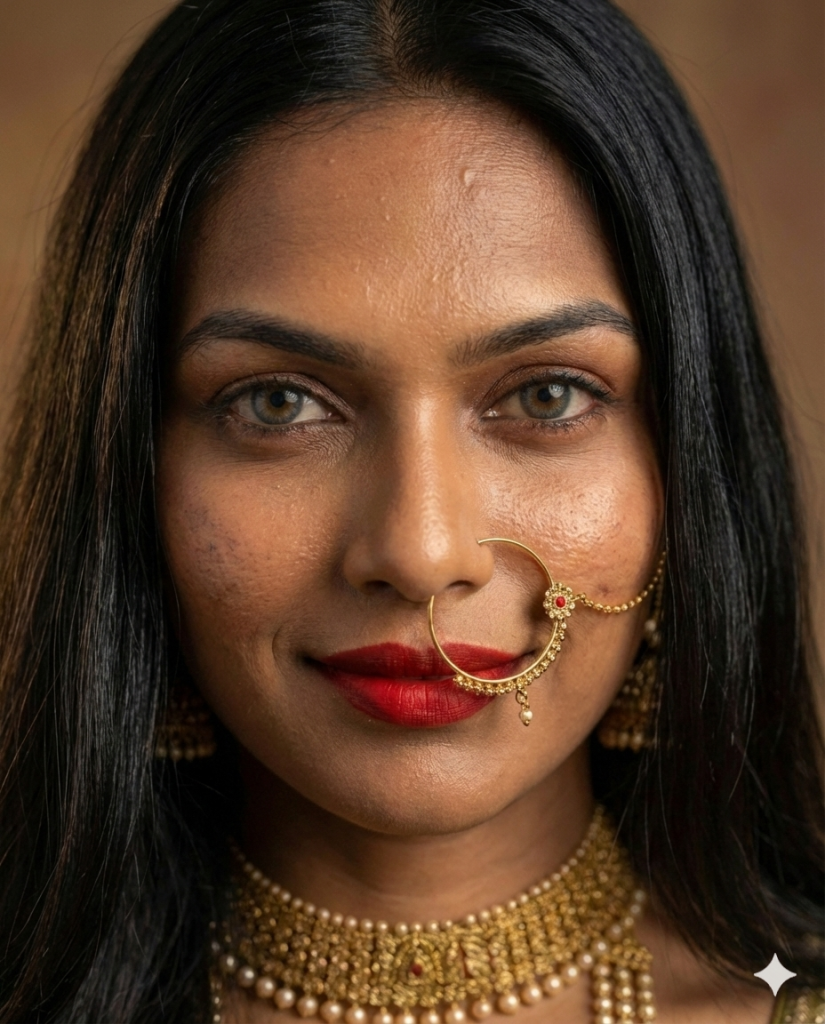
Prompt Example: Extreme Close-up AI Photography – Lock facial identity using the uploaded reference image. Generate an extreme close-up portrait capturing a spontaneous, natural smile. Lips slightly parted, soft laugh lines visible. Eyes bright and expressive. Nose ring chain and choker sparkle under warm golden light. Depth of field extremely shallow, background fully blurred. Skin texture realistic and detailed. Cinematic AI photography with emotional realism.
Close-up of Eyes: Facial Identity Consistency in AI Photography

Eyes are the strongest marker of identity. This angle is ideal for checking facial consistency across multiple AI generations.
Best Use Cases
- High-end portrait photography
- Identity locking validation
- Character consistency tests
Key Focus Points
- Eye sharpness
- Natural reflections
- Minimal distortion
- Clean lighting
In AI image generation, eye-focused shots help validate whether facial identity is truly preserved.
Prompt Example: Eye Close-Up – Identity Validation AI Photography – Using the same reference image, generate a tight close-up focusing on the eyes of the same Indian woman with long black hair. Facial identity must remain perfectly consistent. Partial jewelry visible including nath chain and earrings. Camera: close-up eye-level shot, shot on an 85–100mm lens, natural proportions. Lighting: soft warm studio lighting with gentle reflections in the eyes, consistent shadows. Image intent: identity consistency and emotional connection. Aspect ratio 4:5, photorealistic, high detail.
Close-up of Neck and Jewelry: Product-Focused AI Photography
This camera angle shifts attention from the face to the product while maintaining a premium, human feel.
Best Use Cases
- Luxury AI imagery
- Jewelry branding
- Product catalog visuals
Important details
- Hand placement
- Texture accuracy
- Warm highlights
- Clean composition
This is where AI photography angles meet commercial design requirements.
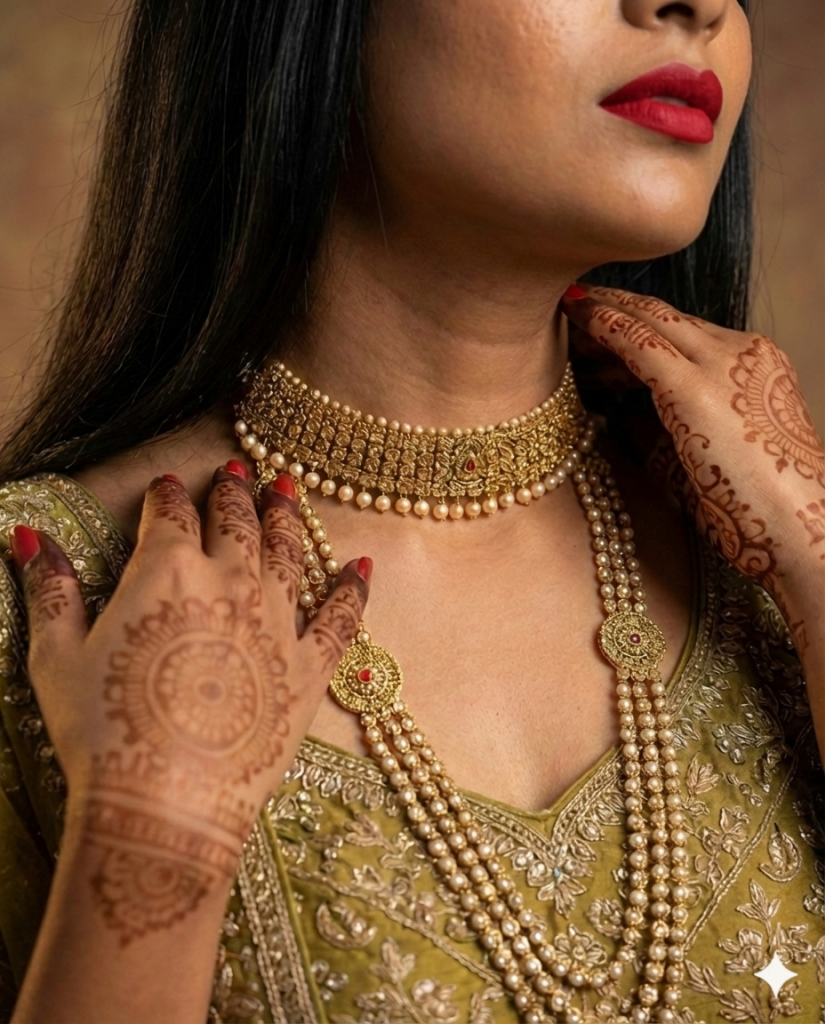
Prompt Example: Jewelry Close-up AI Photography – Use the uploaded reference image to maintain facial identity, though the face remains partially out of frame. Generate a close-up shot focusing on the choker necklace. The model’s hand gently touches the necklace, subtle mehndi visible on fingers. Collarbone and blouse embroidery in frame. Warm golden highlights on jewelry. Photorealistic texture, premium studio lighting.
When Should I Define The Character, Wardrobe, and Accessories in an AI Photography Prompt?
You should define the character, wardrobe, and accessories at the start of the prompt whenever the image has a clear purpose, such as a portrait, fashion visual, or jewelry-focused shot. This helps the AI understand who the subject is, what they are wearing, and what the image is meant to highlight. The best practice is to structure the prompt in layers:
- Character First: who the person is and how their identity is locked
- Wardrobe and Accessories Next: clothing, jewellery, and styling details
- Camera and Lighting after that: angle, lens, and light setup
- Intent Last: what the image is for, such as portrait, fashion, or product focus
This order mirrors how photographers and creative directors think, and it helps AI generate more accurate, purposeful images.
Example Prompt: Using the uploaded reference image to lock facial identity, generate an AI photography portrait of the same woman.
Character: A modern Indian bride with calm, confident expression and natural posture. Facial features, skin tone, and proportions must exactly match the reference image.
Wardrobe and accessories: She is wearing a traditional Indian bridal lehenga in warm gold tones. Jewellery includes a gold choker necklace, a long layered necklace, matching jhumka earrings, and a nath with a delicate chain. No additional accessories.
Camera and lighting: Shot on an 85mm portrait lens with a natural perspective. Soft warm studio lighting with a gentle key light from camera-left and subtle fill light. No wide-angle distortion.
Image intent: A premium bridal portrait focused on jewelry and facial elegance. Photorealistic texture, cinematic quality, and realistic skin detail.
Best practices: Changing Camera Angles Without Breaking Facial Identity
In AI photography, camera angles can be changed freely only when facial identity is treated as a fixed constant. Most identity issues appear when wide shots, close-ups, and high-angle views are generated without controlling lens behavior and lighting. Two factors cause the most problems: lens distortion and lighting inconsistency. Understanding how to manage both allows you to explore different AI photography angles while keeping the subject recognizable and realistic.
Avoid Extreme Lens Distortion: Lens distortion in AI photography usually appears when the model assumes an unrealistically wide or very close lens. This results in stretched facial features, enlarged noses, warped jewelry, or unnatural body proportions. To avoid this, camera behaviour must be defined clearly.
How to Control Lens Distortion
- Specify a realistic focal length such as 50mm or 85mm to maintain natural perspective
- Describe camera distance using framing terms like head-and-shoulders or mid-shot instead of saying the camera is very close
- Add a light constraint when needed, such as “no wide-angle distortion” or “natural facial proportions”
Only use wide or distorted lenses when the effect is intentional, for example in experimental or editorial visuals. In those cases, clearly state that distortion is a stylistic choice, so the AI does not introduce it accidentally.
Keep lighting Realistic and Consistent: Lighting changes can break facial identity faster than camera angle changes. When both lighting and angle shift together, AI often treats the image as a new scene rather than a variation of the same subject. The solution is to treat lighting like a fixed studio setup.
How to Maintain Lighting Consistency
- Describe the lighting setup clearly and repeat it in every prompt
- Use photographic terms such as soft key light, gentle fill light, or warm studio lighting
- Keep colour temperature consistent, for example warm golden tones or neutral daylight
- Change camera angles first, and experiment with lighting only after identity is stable
By keeping lighting constant, AI recognises the subject as the same person even when the framing changes significantly.
Summary: Stable identity comes from controlled variation
In AI photography, camera angles should change, but lens behaviour and lighting should not. Using realistic focal lengths prevents distortion, while consistent lighting preserves facial features across shots. When camera variation enhances composition without altering lens perspective or light quality, AI-generated images remain realistic, recognizable, and professionally usable. This balance between variation and control is what separates experimental outputs from reliable AI photography workflows.
Frequently Asked Questions (FAQ)
What are camera angles in AI photography?
Camera angles in AI photography define the position and perspective from which the subject is generated. Just like real photography, camera angles affect mood, composition, realism, and how viewers perceive the subject in AI-generated images.
How do camera angles improve AI image generation?
Camera angles help control focus, depth, and storytelling in AI image generation. Clear camera direction allows the AI to prioritize facial features, body proportions, or products, resulting in more cinematic and intentional visuals instead of generic outputs.
Can I change camera angles without breaking facial identity in AI?
Yes. Facial identity can remain consistent across different camera angles if you use the same reference image, avoid extreme lens distortion, and keep lighting consistent. Camera angles should change, but facial structure, lens behavior, and lighting setup should stay controlled.
What camera angles work best for realistic AI portraits?
For realistic AI portraits, wide angle full-body shots, high angle portraits, and close-ups using natural perspectives work best. Using realistic focal lengths like 50mm or 85mm helps maintain natural facial proportions and avoids distortion.
Why does facial distortion happen in AI-generated images?
Facial distortion usually occurs when the AI assumes a very wide lens, extreme camera proximity, or inconsistent lighting. This can stretch facial features or alter proportions. Defining lens perspective and lighting clearly in prompts helps prevent this issue.
How important is lighting when using camera angles in AI photography?
Lighting is critical. Even small lighting changes can make the AI treat an image as a new subject. Keeping lighting realistic and consistent across camera angles helps preserve facial identity and overall visual coherence.
Do I need photography knowledge to use camera angles in AI?
Basic photography knowledge helps, but it’s not mandatory. Understanding simple concepts like camera height, distance, and lighting direction is enough to significantly improve AI photography results and visual consistency.
Are camera angles more important than prompts in AI photography?
Camera angles are part of effective prompting. Long prompts alone don’t guarantee good results. Clear camera intent combined with concise prompts produces more reliable and professional AI-generated images.
Final Thoughts: Camera Control Defines AI Photography Quality
Strong AI photography is not accidental. It is directed. When you understand camera angles in AI photography, you move from experimenting to intentionally composing images. This is what turns AI image generation into a serious creative skill. Master camera angles first. Everything else becomes easier.
If You liked this Post, Then Do Read One where I focused on AI Visuals and Brand Imagery Case Study: Why VÉRNOIR Feels Different After Dark